Network Share Browser - Discover and list accessible SMB/CIFS network shares (Updated Oct 2026)
Description
Network Share Browser finds the computers on your network and lists the folders and printers they share (SMB/CIFS shares). For each share you see its type, local path and description, can check whether you are able to open it, and can open it in File Explorer, copy its network (UNC) path or map it to a drive letter — all from one window.
How to use
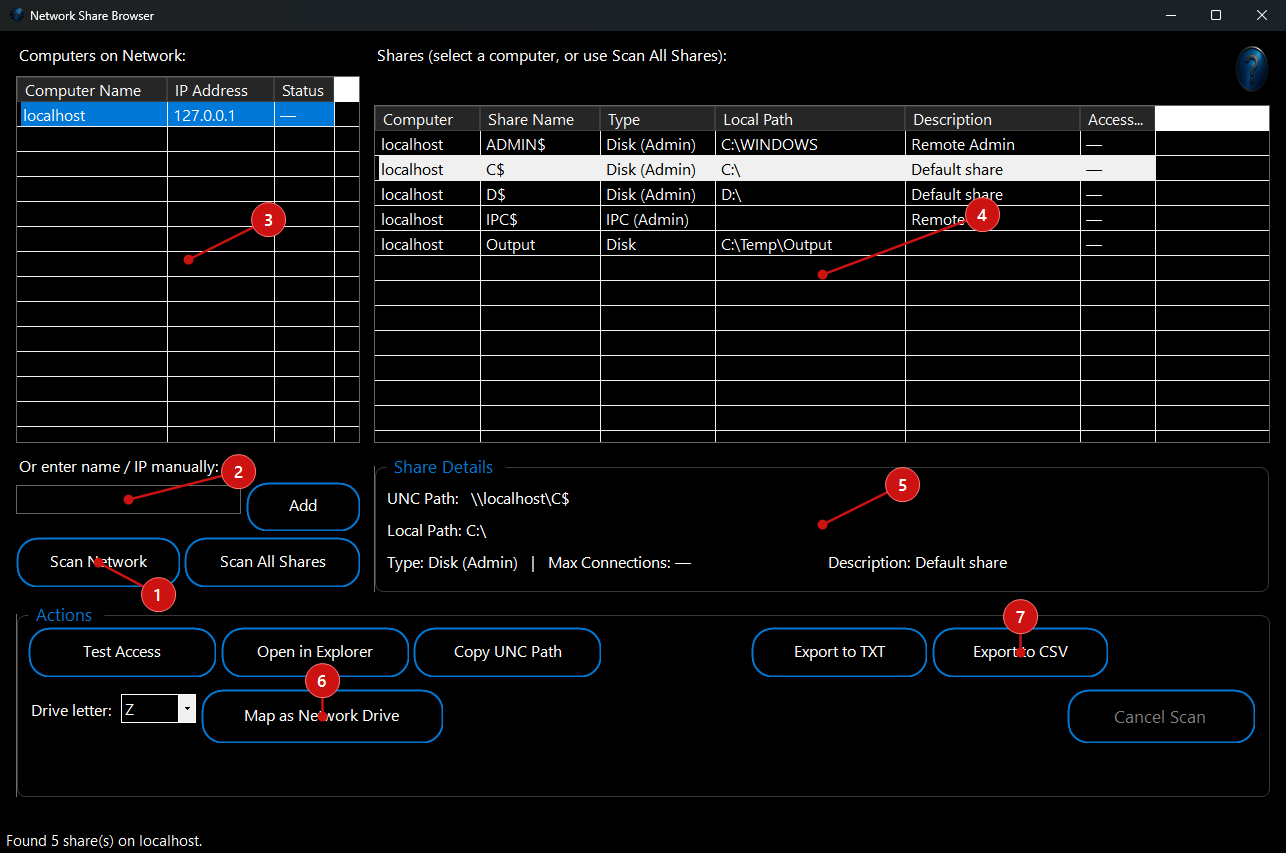 1.
Click
Scan Network to discover the computers on your network, or type a computer name or IP address in
Or enter name / IP manually and click
Add. Each computer is listed with its IP address.
2. Click a computer in
Computers on Network to list its shares, or click
Scan All Shares to list the shares of every computer found.
Cancel Scan stops a scan that is running.
3. Read the
Shares list: computer, share name, type (disk, printer, IPC or special/administrative share), local path, description and whether it is accessible.
4. Select a share to see its details — including the full UNC path, for example \\server\share — in
Share Details.
5. Use the
Actions:
Test Access checks whether you can open the share with your current sign-in,
Open in Explorer opens it,
Copy UNC Path copies its network path, and
Map as Network Drive connects it to the drive letter you pick.
6. Click
Export to CSV or
Export to TXT to save the list of shares for documentation or an audit.
What You Can Do With This Program
- Network audits: list every share on the network and spot folders that are shared more widely than intended.
- Troubleshooting access: check quickly whether a share exists, what path it points to and whether your account can open it.
- Setting up PCs: find the right UNC path and map it to a drive letter in a couple of clicks.
- Documentation: export the share list to CSV or text for hand-over notes and records.