FW Screenshot Recorder

 Free 7-day trial
One-time purchase
Free 7-day trial
One-time purchase
No subscription
No in-app purchases
Full user guide
|

FW Screenshot Recorder
Capture it, mark it up, share it. Screenshots, long scrolling pages and screen recordings with a full
mark-up editor. Buy it once and it’s yours — no monthly fee and nothing locked behind an upgrade.
✔Free 7-day trialEvery feature, no limitations. Decide once you’ve tried it.
✔One-time purchasePay once. You’re never charged again.
✔No subscriptionNo monthly or yearly fee to keep using it.
✔No in-app purchasesEvery feature is included. Nothing extra to unlock.
✔No watermarksNo recording limits. Your captures are saved on your PC.
The screenshot tool that does the whole job
Grab exactly what you need — an area, the whole desktop, a menu that only appears when you click, or a web page
far longer than your screen — and it opens straight in the editor. Add arrows, numbered steps and notes, blur anything
private, then close the editor and the finished picture is already saved and on your clipboard, ready to paste into an email,
chat or ticket.
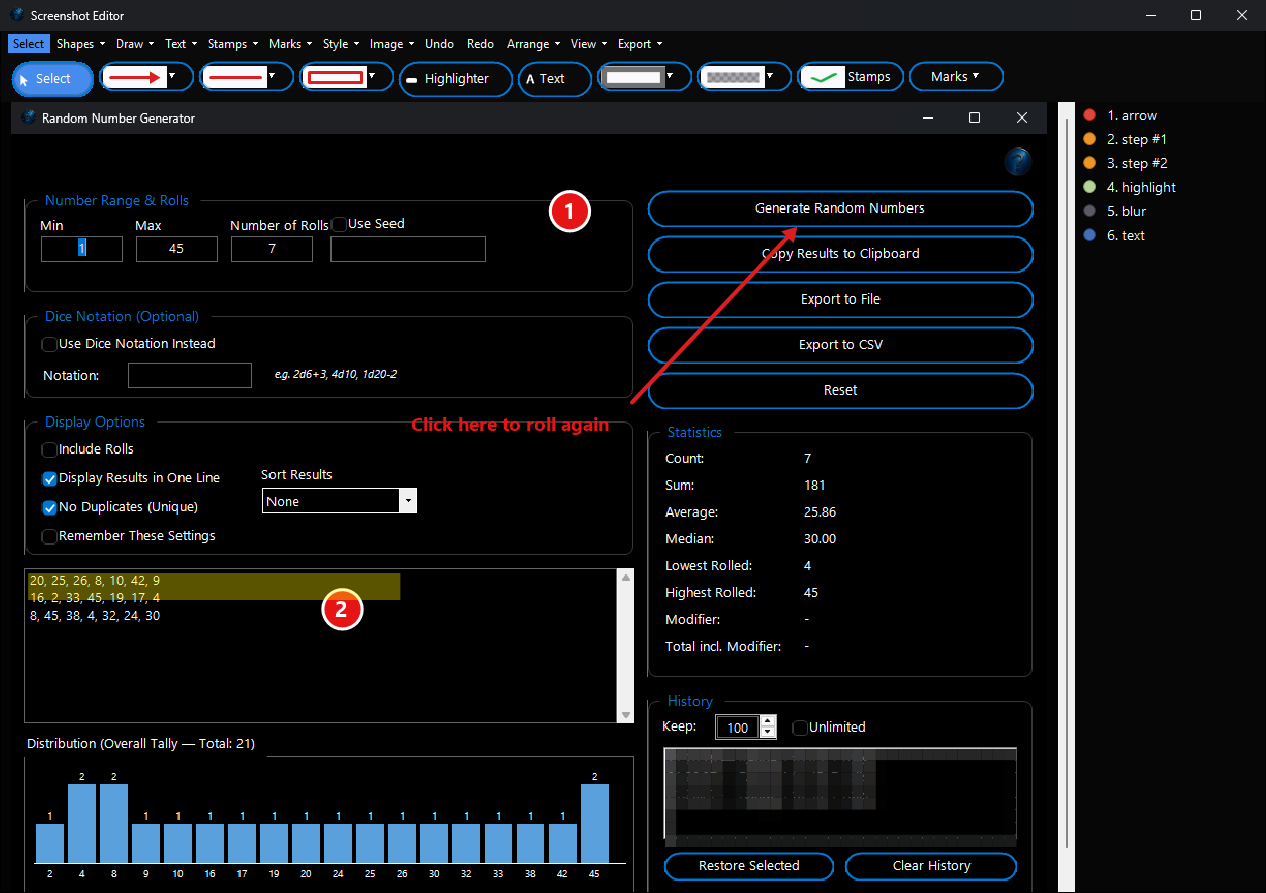
Explain anything in one picture. An arrow, two numbered steps, a highlight, a note and a blurred list, each still editable in the layers list on the right.
▣ Every way to capture
- Area: drag out just the part you want.
- Desktop: every screen at once on multiple monitors.
- Delayed: freezes the screen so open menus and tooltips stay in the shot.
- Scrolling: a whole long page stitched into one image.
● Record your screen
- Record an area or the whole screen to MP4.
- Add your microphone for a voice-over.
- Show your webcam picture-in-picture.
- A small recording bar to stop when you’re done.
✎ A real mark-up editor
- Arrows and lines in many styles, boxes, ellipses and speech bubbles.
- Auto-numbered step badges (1, 2, 3…).
- Text with outlines that stays readable on any background, plus a highlighter and pen.
- Everything stays editable, with full undo.
👁 Hide private details
- Pixelate, blur or black out names, emails and account numbers.
- Over text, the strength is set automatically so it can’t be read.
- Safe to Share finds emails, phone numbers, card numbers and keys for you.
✓ Stamps & watermarks
- APPROVED, DRAFT, CONFIDENTIAL and many ready-made stamps.
- Your own logo as a stamp or a tiled watermark.
- Date, time, file name and “Captured by” stamps.
- Save your favourites as presets.
⚙ Little things that save time
- Copy text out of any screenshot with built-in OCR.
- Close the editor and it’s saved and on the clipboard.
- Save editable projects to change the mark-up later.
- A slim edge toggle keeps capture one hover away.
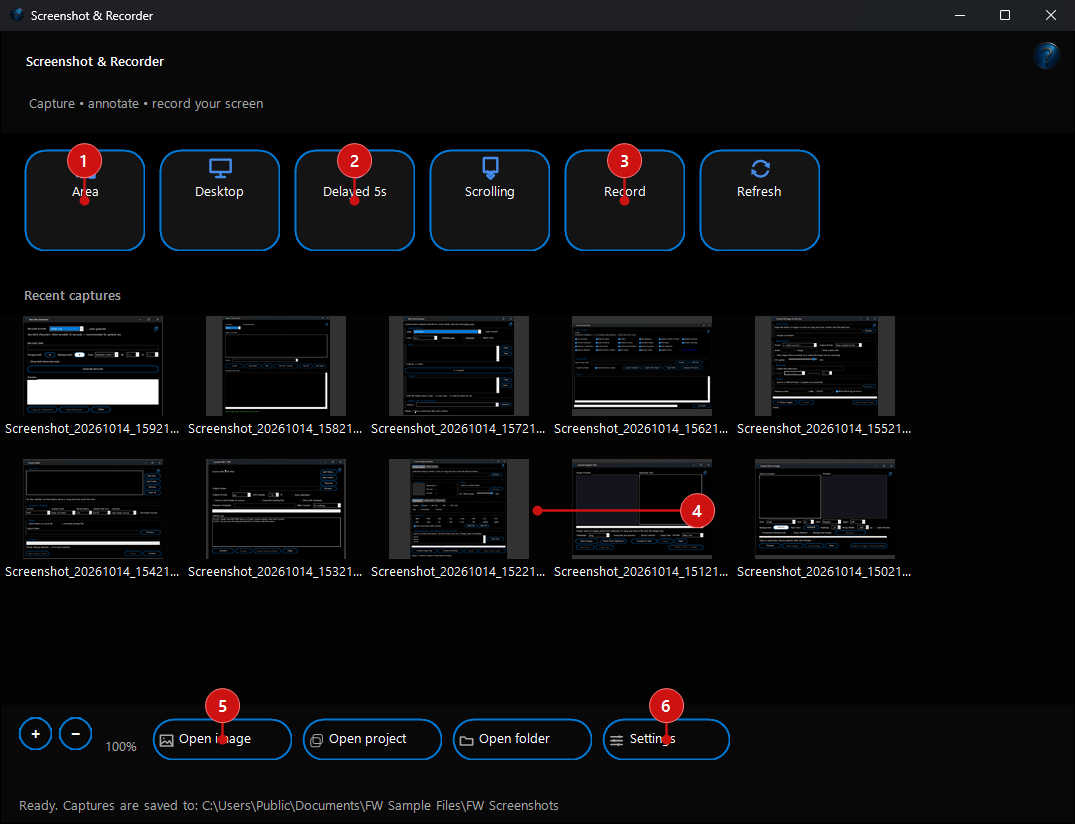
Your launch pad. Big capture buttons along the top (1–3) and your recent captures underneath (4), ready to open again with a double-click.

Out of the way until you need it. The edge toggle sits against the side of your screen; hover over it and the capture options slide out.
Pay once. Keep it.
Many screen capture and recording apps now charge every month, or add watermarks and time limits until you upgrade.
FW Screenshot Recorder is a one-time purchase: buy it once from the Microsoft Store and use every feature for as long as you like.
There’s no subscription, no in-app purchases and no “Pro” upgrade to unlock recording or the editor.
| FW Screenshot Recorder | Typical subscription capture app |
|---|
| Free trial | 7 days, every feature | Often limited or watermarked |
| How you pay | Once | Every month or year |
| Watermarks or recording time limits | None | Often, until you upgrade |
| In-app purchases or add-ons | None | Often |
| Your captures | Saved on your PC | Often uploaded to the cloud |
| Account to sign up for | None, just the Microsoft Store | Usually required |
Who it’s for
Everyday usersShow a friend where to click, save a receipt or a whole web page, or send a screenshot with the personal bits blurred out.
IT & supportStep-by-step guides with numbered badges, clear bug reports, and quick screen recordings that show the problem in motion.
Teams & trainersBranded, watermarked screenshots and short recorded demos for documentation, training and social posts.
Questions
- Can I try it before I buy?
- Yes. Install it from the Microsoft Store and use it free for 7 days, with every feature and no limitations. If you like it, buy it once and keep it; there’s nothing else to pay.
- Is it really a one-time purchase?
- Yes. You pay once in the Microsoft Store. There is no subscription, no renewal and nothing to buy inside the app.
- Do I get updates?
- Yes. Updates are delivered through the Microsoft Store at no extra cost.
- Are my screenshots uploaded anywhere?
- No. Captures and recordings are saved to the folder you choose on your PC (your Pictures folder by default) and are not sent to us or to any online service.
- Is it the same Screenshot Recorder that’s in FW Admin Tech Tools Pro?
- Yes, it’s the same tool, sold on its own for people who only need screen capture. If you already own
FW Admin Tech Tools Pro, you already have it.
- What do I need to run it?
- A PC with Windows 10 or Windows 11. Install it from the Microsoft Store and it keeps itself up to date.
- Where can I learn how each feature works?
- The Screenshot Recorder user guide walks through every capture mode and editor tool.
Want more than screenshots? Screenshot Recorder is also one of the 100+ tools in
FW Admin Tech Tools Pro, alongside PDF Easy, an image editor, a video editor,
and network and system tools — also a one-time purchase.
|