DNS Documenter - Generate DNS-Driven Infrastructure Documentation (Updated Oct 2026)
Description
The DNS Documenter provides an efficient way to gather, view, and export a complete DNS profile for a specified domain. From a single domain name it collects the full set of DNS records, checks the domain’s email-security posture, runs a WHOIS lookup, probes common subdomains, and grades overall email deliverability — then presents everything as one organised report. It is designed for administrators and documentation specialists who need a clear, accurate record of how a domain is configured. Reports can be exported in Text, Markdown, HTML, or JSON, making it easy to store in internal documentation systems, attach to change records, or hand over during audits and migrations.
How to use
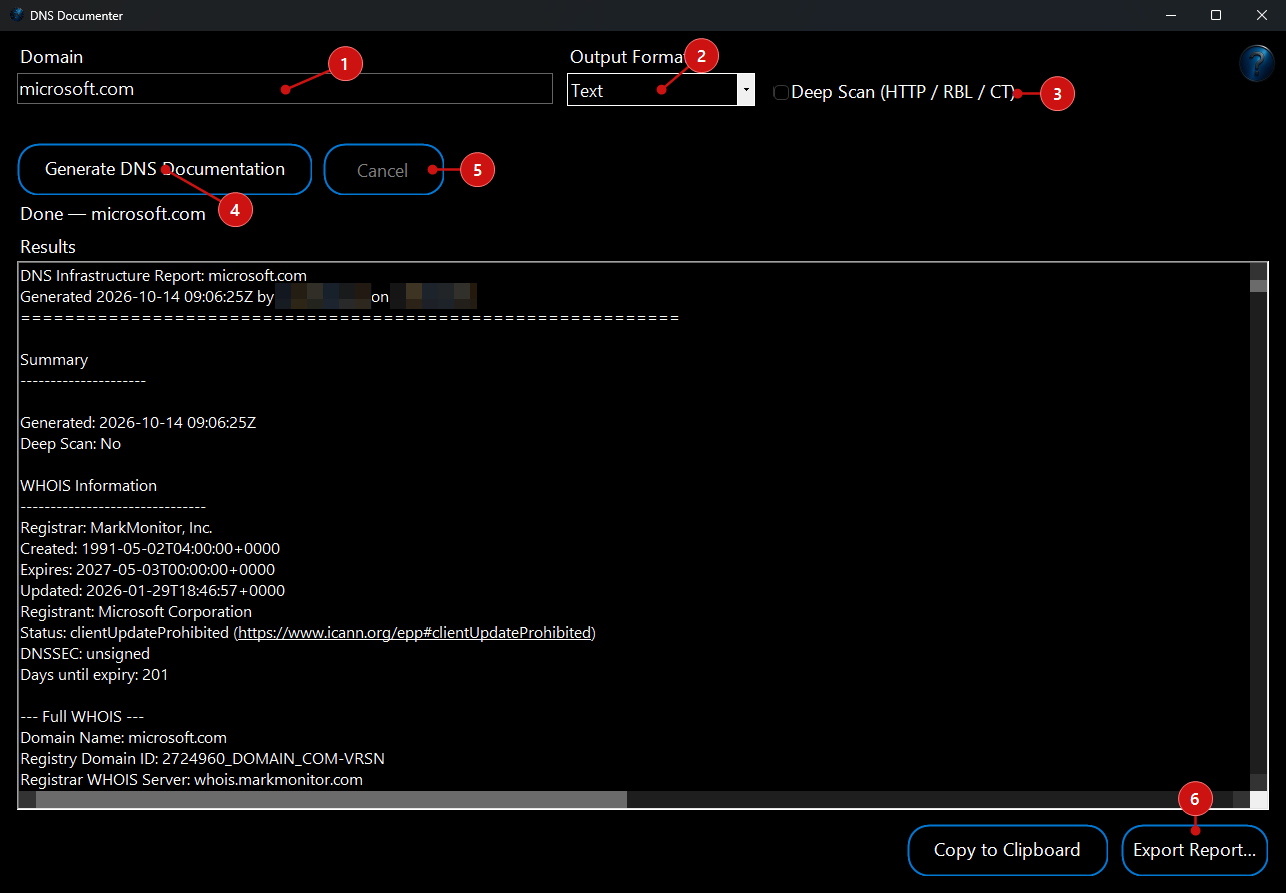 1.
Enter the domain you want to document in the
Domain field. You can type a plain domain such as
example.com, or paste a full web address — the tool automatically strips
http://,
https://, paths, and ports and validates the domain before it runs.
2. Choose an output format from the
Format list:
Text,
Markdown,
HTML, or
JSON. Text and Markdown suit notes and wikis, HTML produces a self-contained styled page, and JSON gives you structured, machine-readable data for scripts or other systems.
3. (Optional) Tick
Deep Scan (HTTP / RBL / CT) to go beyond DNS. Deep Scan adds an HTTP/TLS banner check on the domain’s web hosts, queries Certificate Transparency logs for additional certificate-issued hostnames, and checks the resolved mail IPs against common blacklists (RBLs). Leave it unticked for a faster, DNS-only report.
4. Click
Generate DNS Documentation. A live status line beneath the buttons shows what the tool is working on — querying records, resolving hosts, probing subdomains, and building the summaries — and the report fills in as each section completes.
5. To stop a run at any time, click
Cancel. The tool halts cleanly and keeps whatever it has already gathered.
6. When the report is ready, review it in the results area. Use
Copy to Clipboard to paste it straight into another document, or click
Export Report… to save it to disk. The Export dialog defaults to the extension that matches your chosen format (
.txt,
.md,
.html, or
.json) with a timestamped file name; after saving an HTML report you’ll be offered the option to open it in your browser.
What the report includes
A single run gathers a broad picture of the domain in one place:
- DNS records: A, AAAA, MX, NS, SOA, CNAME, TXT, SRV, CAA, and the DNSSEC record types (DNSKEY, DS, RRSIG) — each shown with its TTL. Address records include reverse-DNS (PTR) lookups, MX and CNAME targets are resolved to their IPs, and SRV records are labelled with the service they point to (for example SIP, Autodiscover, IMAP or SMTP).
- Email security: SPF, DMARC, DKIM (probed across common selectors), BIMI, and MTA-STS are detected and summarised, along with TLSA/DANE records where present, so you can see the sending domain’s protection at a glance.
- WHOIS: registrar, key dates, registrant and status are extracted into a summary — including a days-until-expiry figure that flags a domain expiring soon — followed by the full WHOIS record.
- Subdomain discovery: a set of common subdomains is probed, resolved records are listed, and potential subdomain-takeover risks are highlighted where a name points to an unclaimed service.
- DNSSEC and zone health: the report notes whether the domain is DNSSEC signed and validated, summarises name-server count and TTL ranges, and calls out items such as a missing CAA record.
- Email Deliverability Grade: the email-security findings are scored into a simple A–F grade so you can quickly gauge how well the domain is set up to send trusted mail.
What You Can Do With This Program
Potential Uses for DNS Documenter Tool:
- Infrastructure Documentation: Collect and export the full DNS profile for a domain to maintain clear, up-to-date network documentation.
- Change Management: Capture a point-in-time snapshot before and after DNS edits so configuration changes can be reviewed and compared over time.
- Migration Planning: Prepare comprehensive DNS records ahead of a domain, mail, or server migration to a new provider or platform.
- Disaster Recovery: Generate backup copies of DNS and mail settings to enable fast, accurate restoration if records are lost or corrupted.
- Reporting: Produce easy-to-read summaries of a domain’s DNS and email configuration for management reviews and audits.
- Knowledge Transfer and Onboarding: Supply organised DNS documentation to bring team members up to speed on how a domain is set up.
- Email Deliverability Reviews: Use the SPF, DKIM, DMARC, BIMI, MTA-STS findings and the A–F grade to check that a domain is configured to send trusted mail.
- Security Auditing: Identify outdated, insecure, or unnecessary records, review DNSSEC and CAA coverage, and spot possible subdomain-takeover risks as part of regular security reviews.
- Platform Integration: Export DNS data in Text, Markdown, HTML, or JSON for seamless integration with internal documentation systems, wikis, or scripts.