FW PDF Easy
 Free 7-day trial
One-time purchase
Free 7-day trial
One-time purchase
No subscription
No in-app purchases
Full user guide
|

FW PDF Easy
The complete PDF editor for Windows. Buy it once and it’s yours —
no monthly fee, no yearly renewal and nothing locked behind an upgrade.
✔Free 7-day trialEvery feature, no limitations. Decide once you’ve tried it.
✔One-time purchasePay once. You’re never charged again.
✔No subscriptionNo monthly or yearly fee to keep using it.
✔No in-app purchasesEvery feature is included. Nothing extra to unlock.
✔Your files stay with youDocuments are edited on your PC, never uploaded.
Everything you need to do with a PDF, in one window
Open one or several PDFs in tabs and fix the typo, black out the private details, sign it, merge it with another
file, lock it with a password, and save. Your changes are held as you work, with full undo and redo, and nothing is written
to disk until you choose Save. Under the hood is a professional PDF engine, so redactions really remove the content, signatures
are genuine and the files you save are proper PDFs that open everywhere.
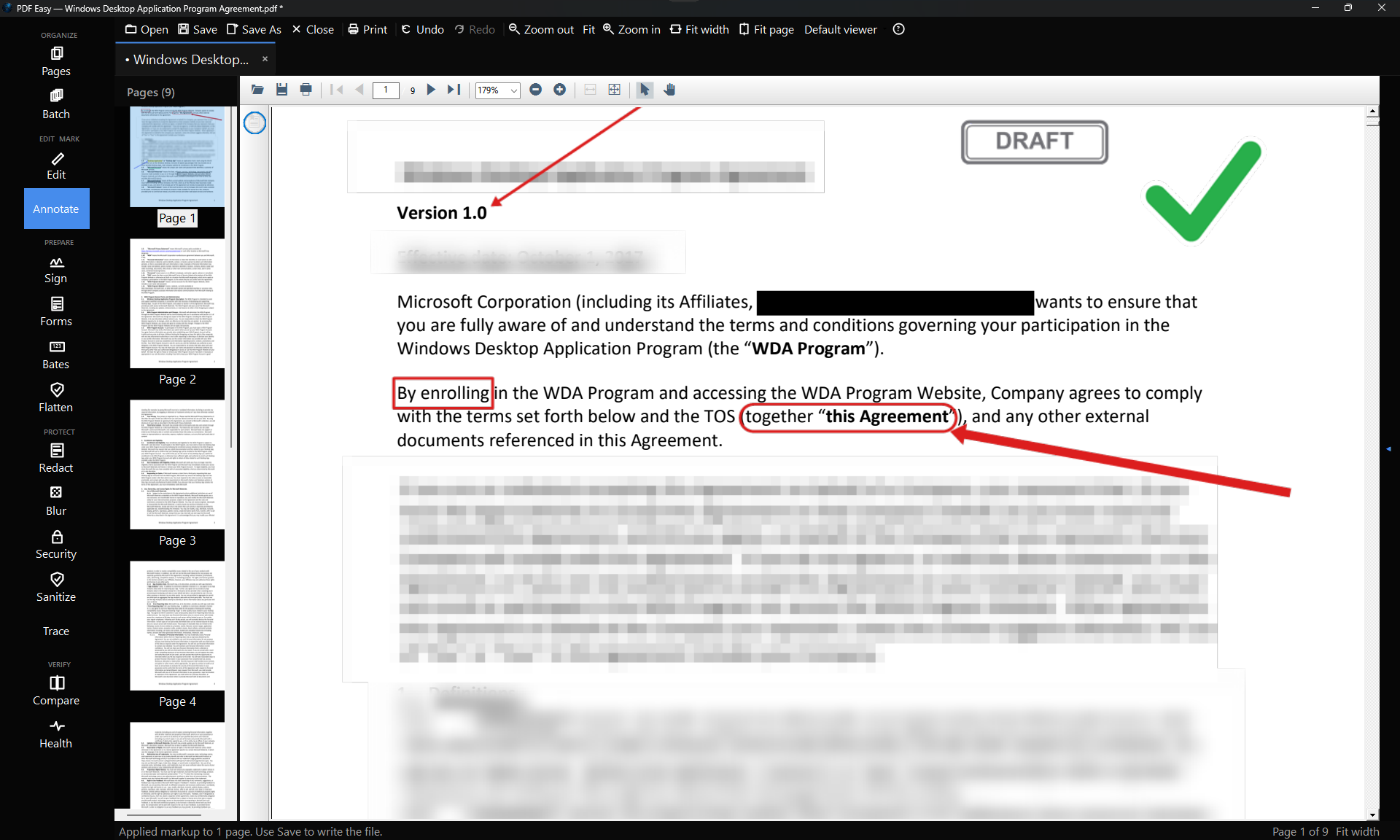
One window, every tool. Tabs for each open document, page thumbnails and a tool rail down the left. Here a page has been marked up with arrows, a stamp, a black-box redaction and a blurred paragraph.
✎ Edit the text that’s already there
- Click into a paragraph and type, like a word processor.
- Matches the original font, size, colour and line spacing, and reflows the paragraph.
- Find & replace across the whole document.
- Add new text, pictures and paper-coloured whiteout.
■ Redact for real
- Hidden content is removed from the file, not just covered with a box.
- Black box, pixelate or blur: all of them are real redactions.
- A built-in pattern library finds emails, phone numbers, card numbers and IDs for you.
- Check each match before anything is removed.
✒ Fill & sign
- Draw or import your signature and keep up to 30 in a quick-pick library.
- Initial every page and sign the last one in one click.
- Fill in forms, add your own form fields, or sign with a certificate.
- Ticks, crosses and dates for flat forms that have no fields.
☰ Organise pages
- Merge PDFs, then remove, extract, rotate and reorder pages.
- Split a large document into smaller files.
- Extract the text to TXT or CSV in reading order.
- Flatten forms and annotations into the page.
🔒 Protect & archive
- AES-256 passwords with print, copy and edit permissions.
- Strip hidden metadata before a file goes out.
- Save archival PDF/A copies.
- A health check finds hidden data, missing fonts and other problems.
⚙ Power tools
- Compare two versions and see exactly what changed.
- OCR makes scanned PDFs searchable.
- Bates numbering and batch jobs across many files.
- Traceable copies show who leaked a document.
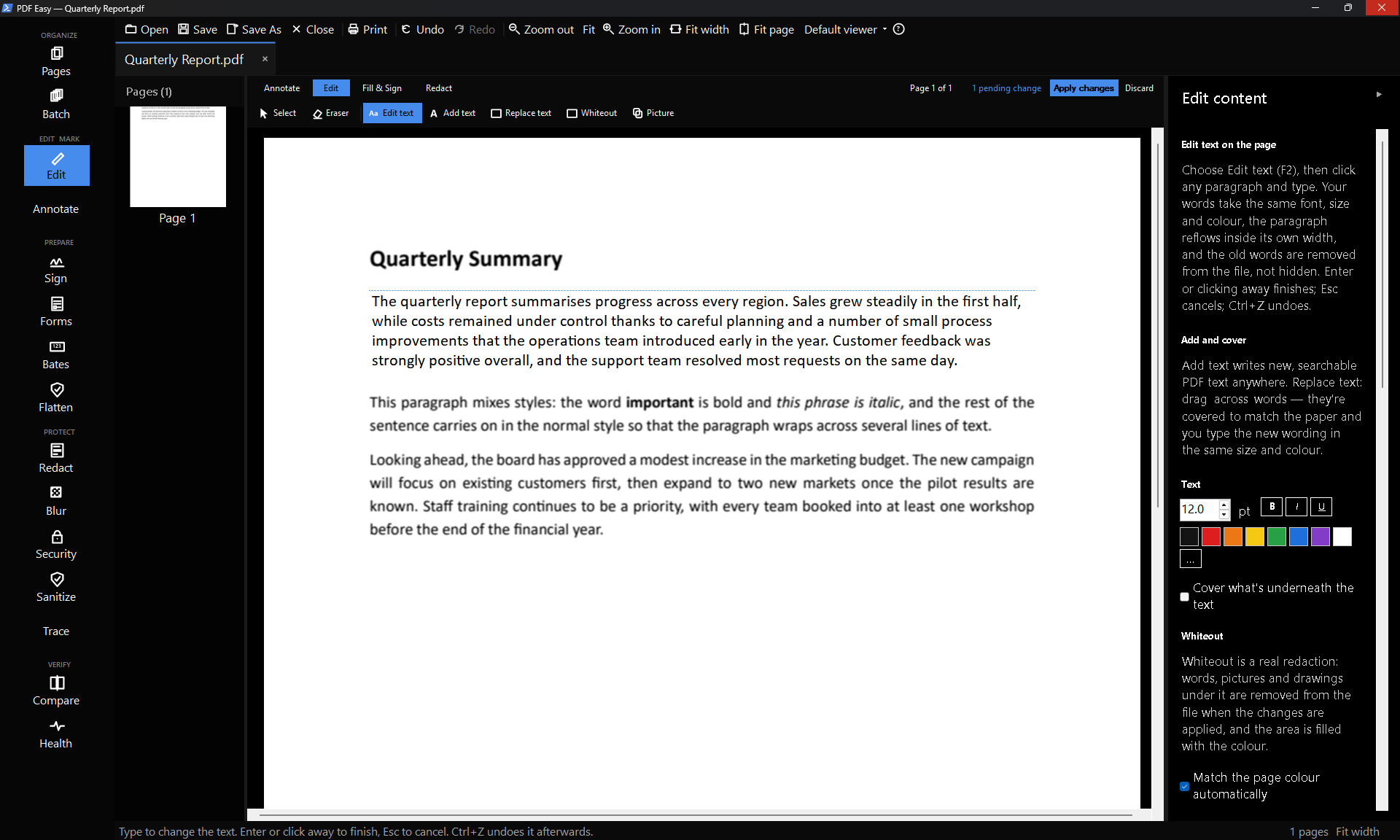
Fix a typo without starting again. Edit text changes the words already in the PDF, in the same font and style.
Pay once. Keep it.
Many PDF editors now charge every month to edit, sign or redact your own documents. FW PDF Easy is a
one-time purchase: you buy it once from the Microsoft Store and use every feature for as long as you like.
There’s no subscription, no in-app purchases and no “Pro” tier hiding the good features.
| FW PDF Easy | Typical subscription PDF editor |
|---|
| Free trial | 7 days, every feature | Often limited or watermarked |
| How you pay | Once | Every month or year |
| Stop paying and… | You’re never asked to | Editing and signing stop working |
| In-app purchases or add-ons | None | Often |
| Your documents | Stay on your PC | Often uploaded to the cloud |
| Account to sign up for | None, just the Microsoft Store | Usually required |
Who it’s for
Home & personalSign a lease, fill in a form, fix a CV, or combine scanned pages into one file, without paying monthly for something you use a few times a year.
Small businessSign contracts, protect quotes with a password, stamp invoices and strip hidden data before files go to clients.
Legal, HR & adminReal redaction with a pattern library, Bates numbering, document comparison, batch jobs and traceable copies.
Questions
- Can I try it before I buy?
- Yes. Install it from the Microsoft Store and use it free for 7 days, with every feature and no limitations. If you like it, buy it once and keep it; there’s nothing else to pay.
- Is it really a one-time purchase?
- Yes. You pay once in the Microsoft Store. There is no subscription, no renewal and nothing to buy inside the app.
- Do I get updates?
- Yes. Updates are delivered through the Microsoft Store at no extra cost.
- Are my documents uploaded anywhere?
- No. FW PDF Easy works on the files on your PC. Your documents are not sent to us or to any online service.
- Is it the same PDF Easy that’s in FW Admin Tech Tools Pro?
- Yes, it’s the same tool, sold on its own for people who only need PDF editing. If you already own
FW Admin Tech Tools Pro, you already have it.
- What do I need to run it?
- A PC with Windows 10 or Windows 11. Install it from the Microsoft Store and it keeps itself up to date.
- Where can I learn how each tool works?
- The PDF Easy user guide walks through every tool step by step.
Want more than PDFs? PDF Easy is also one of the 100+ tools in
FW Admin Tech Tools Pro, alongside an image editor, a video editor,
the Screenshot Recorder, and network and system tools — also a one-time purchase.
|