|

FW System Performance Optimiser
Speed up and tidy a slow Windows PC: clean out junk, trim start-up programs and fix common problems, all from one window.
✔Just this one toolSmall, focused and quick to learn.
✔From the Microsoft StoreInstalls safely and updates itself.
✔No subscriptionBuy it once through your Microsoft account.
✔Runs as administratorIt needs administrator rights to clean and repair Windows, and asks for them when it starts.
What it does
System Performance Optimiser brings Windows’ clean-up, repair, performance and privacy settings together in one place, written in plain English. You see a preview of every change before it’s made, and the changes are recorded so most of them can be undone later.
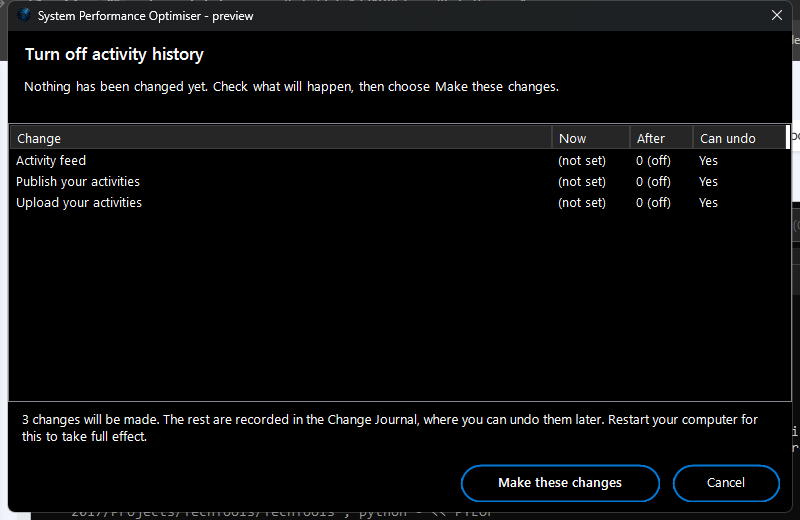
Before anything changes you see a preview of exactly what will be changed, and most changes can be undone later.
🧹 Clean up
- Temporary files, browser caches and thumbnails
- Recycle Bin and old Windows Update files
- See how much space each one frees
⚡ Speed up
- Turn off start-up programs you don’t need
- Faster power plan and visual effects
- Services and scheduled tasks explained in plain words
🔧 Fix and protect
- Repair Windows system files
- Reset Windows Update when it’s stuck
- Privacy settings and network resets
- Preview first, undo later
💾 Drive health
- S.M.A.R.T. status warns of a drive that may fail
- Back up and replace it before it does
🔋 Battery report
- See how much a laptop’s battery has worn
- Know when it’s time for a new one
⚡ Easy Mode
- Run the recommended clean-up and fixes in one click
- Or pick each task yourself
Pay once. Keep it.
Many tools like this are now sold as a monthly subscription. FW System Performance Optimiser is a one-time purchase: you buy it once from the Microsoft Store and keep using it for as long as you like, with updates included. There’s no subscription and no account to create.
| FW System Performance Optimiser | Typical PC-cleaner subscription |
|---|
| How you pay | Once | Often every month or year |
| Stop paying and… | You’re never asked to | It stops working |
| Account to sign up for | None, just the Microsoft Store | Usually required |
Who it’s for
Anyone with a slow, cluttered or misbehaving home or office PC.
HomeMake an older PC feel quicker and free up space without learning Windows’ hidden settings.
Small officeKeep the office PCs tidy, fix a stuck Windows Update and check the drives before one fails.
Privacy-mindedTurn off the advertising ID, activity history and other data Windows collects, explained in plain words.
Questions
- How much is it, and how do I pay?
- It’s sold through the Microsoft Store, which shows the price in your own currency on the app’s page. You pay once through your Microsoft account; there’s no subscription.
- Do I get updates?
- Yes. Updates come through the Microsoft Store at no extra cost.
- Is it the same System Performance Optimiser that’s in FW Admin Tech Tools Pro?
- Yes, it’s the same tool, sold on its own for people who only need this one. If you already own FW Admin Tech Tools Pro, you already have it.
- What do I need to run it?
- A PC with Windows 10 or Windows 11. Install it from the Microsoft Store and it keeps itself up to date.
- Where can I learn how to use it?
- The System Performance Optimiser guide walks through every part of the tool step by step.
- Why does it ask for administrator rights?
- Cleaning and repairing Windows needs them, so it asks Windows for them when it starts, like any other system tool.
Want more than one tool? System Performance Optimiser is also one of the 100+ tools in
FW Admin Tech Tools Pro, alongside PDF Easy, Screenshot Recorder,
an image editor and many more Windows, network and file tools.
|